Accessing STM32 AHB-AP with ESP32 and Embedded Rust
Use an ESP32 and Embedded Rust to communicate with an STM32 through SWD. Learn how to power up the debug system, select the AHB Access Port, and verify the connection by reading the AP IDR. In the previous article, I explained the SWD protocol used by debug probes and programmers. I then showed how we can read something called the IDCode from the DP register of the STM32 using an ESP32. It was a simple demonstration that we can make an ESP32 communicate with the STM32 core using SWD. This article is a continuation of that. This time, we will go one step further and access the Access Port (AHB-AP). Once we can access the AHB-AP, we will have the foundation needed to access the STM32 memory. In the next article, we will use this to flash firmware to the STM32. I have already successfully used the ESP32 as a programmer to flash firmware into an STM32F103C8T6 (Blue Pill) board and run a simple LED blinky program. However, I decided to split the remaining steps into another article because the complete implementation was becoming too dense to fit into a single article. The overall flow is: Before moving further, I have restructured the code to keep things organized. We have separate modules for the STM32F1-specific code and the SWD code, while The project structure looks like this: In the last article, we only read from the registers. However, this time we will also need to write to registers. The I have created an enum for the Debug Port registers since we will be working with multiple registers. We can then create small wrapper functions to read from and write to the Debug Port registers. So far, we have not accessed the Access Port (AHB-AP in our case). We have only talked to the Debug Port. In order to access the AHB-AP and use it to access the STM32 memory, we first need to power up the debug and system domains. A power domain is a part of the chip whose power can be controlled separately. Here, we are simply making sure that the debug and system parts needed for our SWD communication are powered up. To achieve that, we will modify the After setting the request bits, we read the As you already know, the Debug Port can be connected to multiple Access Ports (APs). We need to select which AP we want to work with. We can do this using the Since we are working with the AHB-AP, we will keep Unlike the Debug Port registers, there are more Access Port registers. We can’t select them just using the two address bits available in the SWD request. To access the additional registers, the AP register space is divided into banks. The bank is selected using the The following are the AHB-AP registers that we will use: Let’s say we want to read the AHB-AP The upper part, The The lower part of the address is For We will represent these AHB-AP registers as a simple enum: We will create a simple wrapper function to select the Access Port and its register bank. Since we will only work with the AHB-AP, we will keep We will access two banks: Next, we will create helper functions to read from and write to registers of the Access Port. The AP read operation is slightly different from reading a DP register because AP reads are “posted”. This means that the result of an AP read is returned on the next transfer. We can retrieve this result by reading the For writing to an AP register: The AHB-AP Identification Register value for my STM32 Blue Pill is Now we can put everything together in the In main, we create the In the first article, we saw how to access the Debug Port registers. In this article, we accessed the Access Port registers. With this, we now have the foundation needed to access the STM32 memory through the AHB-AP. In the next article, we will use this to access the STM32 Flash controller and program our firmware. You can find the complete code for this project on GitHub. interface Access Port AHB-AP.jpg)
Plan
Structure
main will contain only the code needed to put everything together. Any registers and functions specific to the STM32F1 will be placed in the stm32f1 module.├── src
│ ├── bin
│ │ └── main.rs
│ ├── lib.rs
│ ├── stm32f1.rs
│ └── swd.rs Writing to a Debug Port Register
write_register function is almost similar to the read_register function, except that we send a Write access request and then send the data bits along with the calculated parity bit.fn write_register(&mut self, port: Port, address: u8, value: u32) -> Result<(), SwdError> {
let request = Self::make_request(port, Access::Write, address);
self.swdio_output();
// Request.
self.write_bits(request as u32, 8);
// Turnaround.
self.swdio_input();
self.clock();
// ACK.
self.read_ack()?;
// Target -> host turnaround.
self.clock();
// Host now owns SWDIO.
self.swdio_output();
// Data.
self.write_bits(value, 32);
// Parity.
let parity = (value.count_ones() & 1) != 0;
self.write_bit(parity);
self.idle_cycle();
Ok(())
}
/// Debug Port Read Registers
#[derive(Clone, Copy)]
pub enum DpReadRegister {
    Idcode = 0x00,
    CtrlStat = 0x04,
    Resend = 0x08,
    Rdbuff = 0x0C,
}

/// Debug Port Write Registers
#[derive(Clone, Copy)]
pub enum DpWriteRegister {
    Abort = 0x00,
    CtrlStat = 0x04,
    Select = 0x08,
}/// Read DP Register
pub fn read_dp(&mut self, address: DpReadRegister) -> Result<u32, SwdError> {
self.read_register(Port::Dp, address as u8)
}
/// Write to DP Register
pub fn write_dp(&mut self, address: DpWriteRegister, value: u32) -> Result<(), SwdError> {
self.write_register(Port::Dp, address as u8, value)
} Power Up the Debug System
CTRL/STAT register in the Debug Port. The register has two power-up request bits: CDBGPWRUPREQ (28th bit of the register) and CSYSPWRUPREQ (30th bit of the register). CDBGPWRUPREQ requests power for the debug domain, while CSYSPWRUPREQ requests power for the system domain. We set both bits to power up these domains.pub fn power_up_debug(&mut self) -> Result<(), SwdError> {
const CDBGPWRUPREQ: u32 = 1 << 28;
const CDBGPWRUPACK: u32 = 1 << 29;
const CSYSPWRUPREQ: u32 = 1 << 30;
const CSYSPWRUPACK: u32 = 1 << 31;
defmt::info!("Writing CTRL/STAT power-up request...");
self.write_dp(DpWriteRegister::CtrlStat, CDBGPWRUPREQ | CSYSPWRUPREQ)?;
defmt::info!("Reading CTRL/STAT...");
for _ in 0..100 {
let status = self.read_dp(DpReadRegister::CtrlStat)?;
if status & (CDBGPWRUPACK | CSYSPWRUPACK) == (CDBGPWRUPACK | CSYSPWRUPACK) {
return Ok(());
}
self.delay.delay_micros(100);
}
Err(SwdError::PowerUpTimeout)
}CTRL/STAT register and wait for the corresponding CDBGPWRUPACK and CSYSPWRUPACK bits. These bits indicate that the debug and system domains have acknowledged the power-up requests. Selecting Access Port
SELECT register in the Debug Port. The APSEL field helps us choose which AP we want to access. This field occupies bits 24 through 31 of the SELECT register.APSEL set to 0. Accessing AP Registers
APBANKSEL field in the Debug Port’s SELECT register. This field provides the upper address bits, A[7:4], while A[3:2] come from the SWD request. Together, these fields determine which AP register we access.Bank Address Read Write 0x00x00CSW CSW 0x00x04TAR TAR 0x00x0CDRW DRW 0xF0xFCIDR N/A IDR register at address 0xFC.0xF, identifies the register bank we want to access. We select this bank by setting the APBANKSEL field of the SELECT register to 0xF.SELECT register is therefore: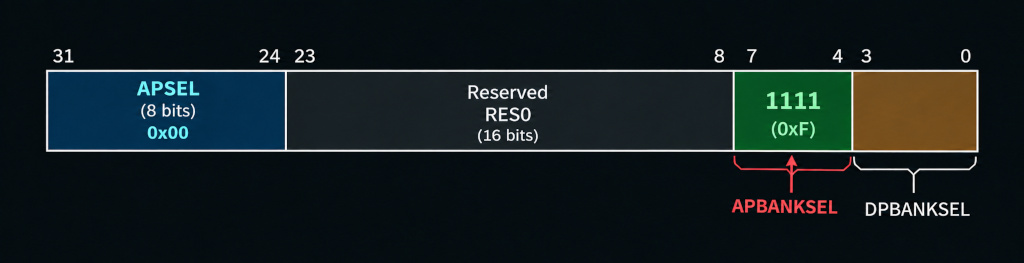
0xC, which is 0b1100. As we discussed in the previous article, the SWD request only contains the A3 and A2 bits of the register address. The lower two bits, A1 and A0, are not included in the request and are always 0.0xC (0b1100), A3 and A2 are both 1. Therefore, the SWD request will look like this:
/// AHB-AP registers
#[derive(Clone, Copy)]
pub enum AhbApRegister {
    Csw = 0x00,
    Tar = 0x04,
    Drw = 0x0C,
    Idr = 0xFC,
}
Function to Select Access Port and Bank
APSEL hardcoded to 0.#[derive(Clone, Copy)]
pub enum ApBank {
Bank0 = 0x0,
BankF = 0xF,
}
/// Select AHB-AP and Register Bank
pub fn select_ap(&mut self, bank: ApBank) -> Result<(), SwdError> {
// APSEL = 0
// APBANKSEL = bank
self.write_dp(DpWriteRegister::Select, (bank as u32) << 4)
}BankF, which we use to read the IDR, and Bank0, which contains the CSW, TAR, and DRW registers that we will use later for memory access and Flash programming. Reading and Writing to AP Registers
RDBUFF register of the Debug Port.pub fn read_ap(&mut self, address: AhbApRegister) -> Result<u32, SwdError> {
self.read_register(Port::Ap, address as u8)?;
self.read_dp(DpReadRegister::Rdbuff)
}/// Write to AP Register
pub fn write_ap(&mut self, address: AhbApRegister, value: u32) -> Result<(), SwdError> {
self.write_register(Port::Ap, address as u8, value)
} Verify the AHB-AP
0x24770011. You can also check the Arm AHB-AP programmer’s model for the Cortex-M3 here. So, we will read the IDR and check if it matches this value.const AHB_AP_IDR: u32 = 0x2477_0011;
// Btw, this function goes into Stm32F1 struct
pub fn verify_ahb_ap(&mut self) -> Result<(), SwdError> {
self.swd.select_ap(ApBank::BankF)?;
let idr = self.swd.read_ap(AhbApRegister::Idr)?;
defmt::info!("AHB-AP IDR = {:#010x}", idr);
if idr != AHB_AP_IDR {
return Err(SwdError::InvalidApIdr(idr));
}
Ok(())
} Putting It All Together
connect() function.// part of the Stm32F1 struct
pub fn connect(&mut self) -> Result<(), SwdError> {
self.swd.switch_to_swd();
let dp_idcode = self.swd.read_dp(DpReadRegister::Idcode)?;
defmt::info!("DP IDCODE = {:#010x}", dp_idcode);
self.swd.power_up_debug()?;
self.verify_ahb_ap()?;
self.swd.select_ap(ApBank::Bank0)?;
Ok(())
}Swd instance, pass it to Stm32F1, and then call connect().let swd = Swd::new(swclk, swdio, delay);
let mut stm32 = Stm32F1::new(swd);
// --------------------------------------------------------
// Connect to STM32
// --------------------------------------------------------
defmt::info!("Connecting to STM32...");
stm32
.connect()
.unwrap_or_else(|e| fail("STM32 connection failed", e));
defmt::info!("SWD connected!"); Final Thoughts